


Control Status Display
The i-stop operation status are displayed.
|
Indication on display |
Control status |
|---|---|
 |
|
|
|
|
|
|
|
 |
|
|
|
|
|
|
|
|
|
|
The i-stop operation status are displayed.
|
Indication on display |
Control status |
|---|---|
|
|
|
|
|
|
|
|
|
|
|
|
|
|
|
|
|
|
|

Page top
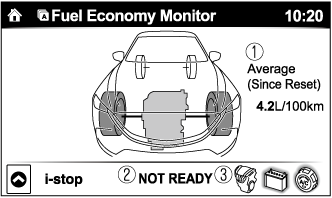
 Displays the accumulated fuel economy.
 icon in the menu. (The average fuel economy and TRIP A displayed in the trip meter (TRIP A) reset at the same time.)
 Displays the readiness status as to whether operation of the i-stop function is available.
 Displays the operation readiness status of the i-stop function on the vehicle side (engine, battery, and A/C) using icon colouring. The blue colour indicates that the i-stop function is ready to operate, and the grey colour indicates that it is not ready for operation.
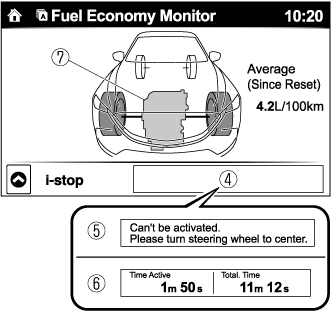
 Displays the i-stop function status while the vehicle is stopped.
 Indicates the operations required by the driver to operate the i-stop function while it is not operating.
 Displays the current amount of time that the i-stop function has been operating and the accumulated amount of time that it has been operating.
 The i-stop function operation status is indicated by the colour of the engine area. The colour is blue during i-stop function operation, and grey when it is not operating.