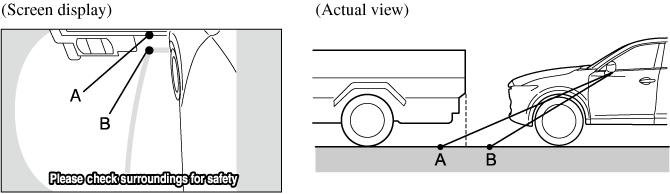
Using the Side View Monitor
The method for driving the vehicle using the side view monitor changes depending on the road circumstances/conditions and the vehicle conditions. The steering operation timing and amount differ according to the conditions, therefore always confirm the vehicle surroundings visually while using the system.


Vehicle parallel guide lines
Use the vehicle parallel guide lines to verify that there are no obstructions such as a road side curb. Pull the vehicle over while making sure the vehicle parallel guide line does not overlap an obstruction such as a road curb. Adjust the steering wheel until the vehicle is parallel to the target parking space and you can park straight into the target parking space.
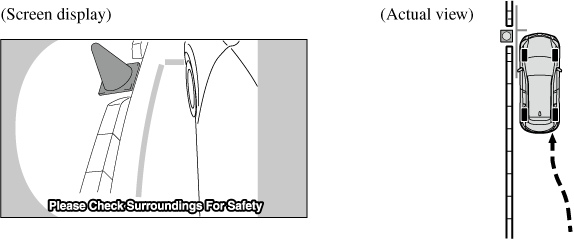
Because there may be a difference between the image displayed on the screen and the actual conditions, always check the safety of the surrounding area in the mirrors and directly with your eyes while parking the vehicle.
-
Even though objects displayed on the screen such as a road curb and division lines of a parking space may appear aligned to the vehicle parallel guide lines, they may not actually be aligned on the ground.
Margin of error between actual screen image and road surface
There may be some margin of error between the actual road surface and the road surface appearing on the screen. A margin of error in the perceived distance could lead to an accident, therefore be aware of the following conditions which can more easily produce errors in the perceived distance.
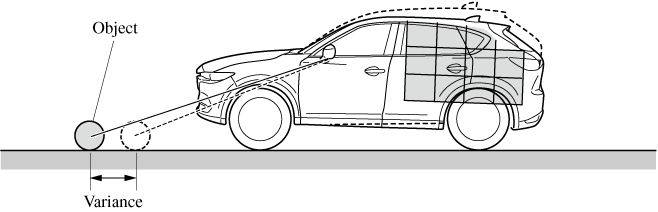
Vehicle tilts due to weight of passengers and cargo.
If the vehicle is tilted, obstructions shot by the camera can appear farther (closer) than the actual distance from the front of the vehicle.
There is a steep up or down grade in the road at the front of the vehicle
If there is a steep up or down grade in the road at the front of the vehicle, obstructions shot by the camera can appear farther (closer) than the actual distance from the front of the vehicle.
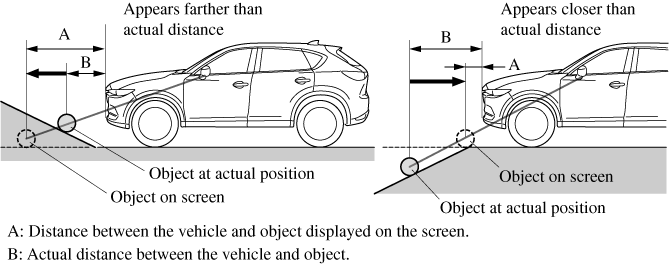
If the vehicle is on a slope, obstructions shot by the camera can appear farther (closer) than the actual distance from the front of the vehicle.
Three-dimensional object on vehicle front
Because the vehicle front guide lines are displayed based on a flat surface, the distance to the three-dimensional object displayed on the screen is different from the actual distance.